

When it comes to writing email copy, endings might just be the most difficult part. How are you supposed to close out so your tone aligns with the rest of your message? What sign-off conveys the right emotion, offers the clearest expression of gratitude and serves as the most appropriate signature for a formal situation?
After all, while a ciao might work for a response to a close relative, it may not be the best way to sign a professional email to a potential client or employer. Determining the appropriate email sign-offs helps you wrap up your message with clarity and avoid an unprofessional closing that could hinder your response rate and diminish your overall email professional reputation.
So what’s the best email closing? The right answer will change according to the content and context of the message, as well as the intended email recipient(s). Understanding how to end an email can also help keep your professional correspondence on track, improve response rates and make every email more effective. Here are some email examples to guide you in crafting that perfect sign-off.
Happy reading,
Dom
25+ Ways to End an Email (By Situation)
Choosing the right sign-off is all about context. Here’s a list of 25+ email sign-offs, organized by situation, to help you match the right tone to every message.
Formal Sign-Offs
Sincerely
Use for formal business correspondence, cover letters or official requests. Avoid in casual or friendly emails, as it can feel stiff.
Yours truly
Appropriate for very formal business letters or legal correspondence. Avoid in everyday work emails; it may sound overly formal.
Respectfully
Best when addressing senior leaders or government officials or in complaint letters. Avoid in casual or peer-to-peer messages.
Cordially
Works for formal invitations, event communication or when you want to convey politeness. Avoid if you want to sound more personable or less formal.
With appreciation
Perfect for formal thank-you notes or when expressing gratitude in a professional setting. Avoid if the message is not about appreciation or gratitude.
Professional but Warm
Best regards
A safe, professional sign-off for most business emails. Use with colleagues, clients or vendors. Avoid if you want to be more casual or more formal.
Kind regards
Slightly warmer than “Best regards,” it’s great for ongoing professional relationships. Avoid in very formal or very casual contexts.
Warm regards
Use when you want to add a bit of friendliness to your professional communication. Avoid in highly formal settings.
All the best
Appropriate for both professional and semi-casual emails; it conveys well wishes. Avoid if you need a more formal tone.
Best wishes
Good for professional emails where you want to sound warm and supportive. Avoid in strictly formal or legal correspondence.
Neutral / Everyday
Thanks
Ideal for most professional emails, especially when you’re requesting something. Avoid if you’re not actually thanking the recipient.
Many thanks
Use when you want to emphasize gratitude more strongly than just “thanks.” Avoid if you haven’t received help or information.
Regards
A straightforward, neutral sign-off for everyday business emails. Avoid if you want to sound warmer or more personal.
Best
Simple and efficient for most work emails. Avoid in very formal or very casual situations.
Cheers
Informal but widely accepted, especially in creative industries. Avoid in formal business communications or with unfamiliar recipients.
Friendly / Casual
Warmly
Good for friendly professional or personal emails, especially when you want to convey warmth. Avoid if the context is strictly business or formal.
Take care
Suitable for colleagues, friends or anyone you know well. Avoid in formal or first-contact business emails.
Talk soon
Use when you expect to continue the conversation or meet again soon. Avoid if no follow-up is expected.
Have a great day
Friendly and upbeat, ideal for colleagues or clients you know well. Avoid in very formal or serious messages.
Speak soon
Similar to “Talk soon,” it’s appropriate when you anticipate future communication. Avoid if you don’t plan to follow up.
Grateful / Appreciative
Thank you
Classic and always appropriate when you’re expressing gratitude. Avoid if you’re not thanking the recipient.
Thanks so much
More enthusiastic than “Thank you.” Use when you want to show extra appreciation. Avoid if the gratitude isn’t sincere.
With gratitude
Best for more personal or heartfelt thanks, even in professional settings. Avoid in routine or transactional emails.
Thanks for your time
Use when someone has given you their attention, especially in sales or support emails. Avoid if the message is not time-sensitive.
Cold Email / Sales
Looking forward to hearing from you
Encourages a response and shows you expect continued communication. Avoid if you don’t actually need a reply.
Hope to connect
Good for networking, outreach or cold sales emails. Avoid in established relationships where a warmer sign-off is appropriate.
Open to a quick chat?
Direct and action-oriented, ideal for sales or networking. Avoid in formal or sensitive discussions.
When You Want a Response
Awaiting your reply
Makes it clear you expect a response. Use in follow-ups or when a reply is necessary. Avoid if the recipient is not obligated to respond.
Let me know your thoughts
Invites feedback or input, suitable for collaborative work. Avoid if the message is informational only.
Any questions welcome
Encourages open communication, especially in instructional or onboarding emails. Avoid if you’re not open to questions.
Signing Off From a Difficult Message
With respect
Use when delivering criticism, bad news or sensitive feedback. Avoid in casual or routine communication.
Sincerely
(See above.) Also works when you want to maintain professionalism in tough conversations.
Regards
(See above.) Neutral enough for challenging messages without sounding cold.
When To Skip a Sign-Off Entirely
In some very brief, ongoing threads (such as rapid-fire internal chats), you can skip a sign-off altogether. This is best reserved for quick, back-and-forth conversations with colleagues you know well. Avoid skipping a sign-off in formal, external or first-contact emails, as it may come across as abrupt or careless.

The Anatomy of a Great Email Ending
A strong email ending is more than just a sign-off. Here’s how to structure the perfect close to every message:
1. The Closing Sentence (the CTA or Wrap-Up Line)
This is the last line before your sign-off, often a call to action or a summary. Examples include “Let me know if you have any questions,” “Looking forward to your feedback,” or “Thanks again for your help.” (Those can all be sign-offs too, so remember not to repeat yourself.) Use it to clarify next steps or express appreciation. Avoid vague or abrupt endings that leave the recipient wondering what to do next.
2. The Sign-Off
Choose the most appropriate sign-off from the list above, based on your relationship with the recipient and the email’s context. It sets the tone for your closing and can influence how your message is received. Avoid mismatched sign-offs (e.g., being too casual in a formal setting or too formal with a close colleague).
3. Your Signature
Include your name, job title, company and relevant contact information. In professional emails, a well-designed signature reinforces your brand and makes it easy for recipients to reach you. Avoid clutter — keep it to three or four lines, and use images sparingly to ensure compatibility across devices.
4. Optional: The P.S.
A postscript (P.S.) can be used to highlight a key detail, deadline or friendly note after your signature. Use sparingly and only when you want to draw attention to something specific. Avoid using a P.S. for critical instructions or information that should be in the main body of your email.
What To Leave Out (Never Do These)
- Never use overly informal or unprofessional sign-offs (e.g., “Later,” “See ya,”) or emojis in business emails.
- Avoid using all caps or excessive punctuation in your sign-off.
- Don’t include unrelated quotes or jokes in your signature unless you know your recipient will appreciate them.
- Never skip proofreading your closing sentence, sign-off and signature for typos or errors.
How to Sign an Email To …
The identity of the email recipient is a big factor in how you choose to sign an email. You don’t want to end up sending your “Fondest regards” to recipients who aren’t your family relations and “All of my love” to your departmental boss. So, always consider your audience. Here’s how to sign an email to:
Your Family and Friends
Etiquette is much looser when talking with family and friends over email. You can sign off just about any way you like, whether referencing an inside joke or with the aforementioned “Ciao.” Be cognizant of the context, though.
Even though it’s a casual email, a well-chosen email sign-off can still convey friendliness without confusion. Feel free to experiment with fun or humorous sign-offs, but remember to keep the tone appropriate for each relationship.
Also remember that sign-offs to colleagues should be work-appropriate in professional settings, even if you’re close friends outside business hours.
Your Clients
Business is business, and when it comes to emailing customers and potential clients, always keep to best practices and be professional. Over time, those parameters may become flexible, like if you want to project a really friendly brand voice.
Easy-going email closings can also help build trust and familiarity between day-to-day contacts and team members. If it’s a customer service issue, however, try to be deferential. In cold emailing scenarios, your professional email sign-off can help set the tone for future communication and demonstrate that you understand how to write email content that resonates.
Your Boss
“Catch you on the flipside, kemosabe” might be what you want to say, but really shouldn’t — unless your boss is a totally rad dude. Otherwise, that closing will likely flop. Office relationships are often governed by decorum, especially when talking to higher-ups.
You might be able to get away with something a little less stiff if you’re emailing an immediate supervisor or manager, but it’s usually better to err on the side of business communication norms rather than risk coming across as unprofessional. A precise, courteous sign-off shows you know how to email professionally and respect organisational hierarchy.
In fact, if you’re filing a sensitive report or issuing instructions by email, a clear, concise professional closing that leaves no ambiguity is usually best.
What About Email Signatures?
Email signatures are a great tool if you’re a prolific emailer, or just want to spice up oft-mundane emails. They often serve as a small but crucial extension of your email template, ensuring that recipients have your contact details, job title and relevant links to social media profiles.
Basically, a signature is a block of text that’s automatically added to the end of every email you send from the account the signature is associated with. Typically, a professional email signature includes your full name, job title, contact information (e.g., work and personal phone numbers), social media icons (LinkedIn, Twitter, etc.) and a business URL.
Usually, some type of graphic or design element is included, like a company logo or colored line. By reviewing a few email signature examples, you can select a layout that suits your personal brand while remaining universally readable.
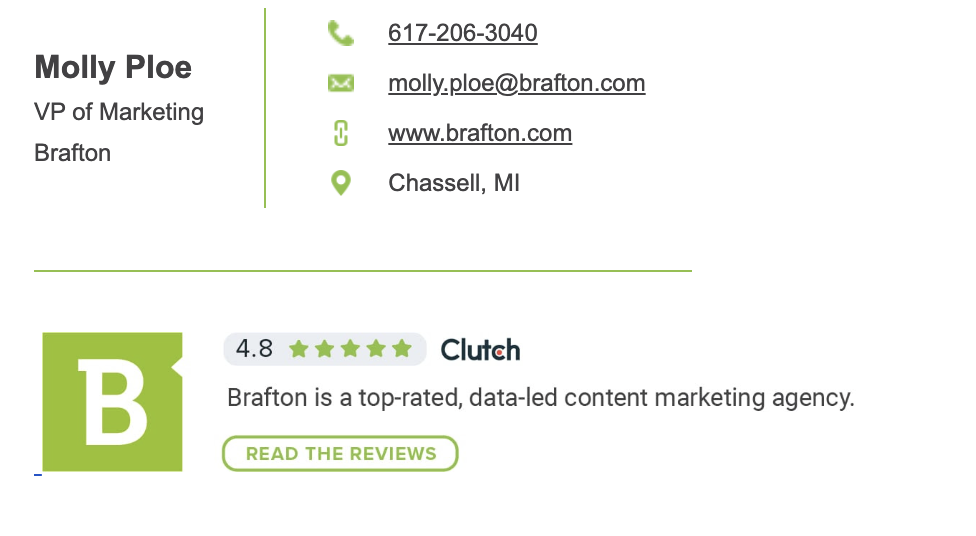
Don’t know how to create one? Gmail has an easy walkthrough for setting up signatures, and Outlook has one too.
Here are some tips for incorporating an email signature into your communication repertoire:
- Keep it to three or four lines: Anything longer and you’re stuffing it. Signatures are meant to be brief and informative. A compact signature also keeps your email endings from becoming too cluttered.
- Use a signature template: If your business has a preferred signature, don’t tinker with it. It’s been designed for your use and brand cohesiveness, so just fill it out with your info.
- Include something personal: If you’re creating a personal signature, think about including a favorite movie or inspirational quote. Just make sure it doesn’t run too long.
- Don’t include an image: A picture or graphic image would sure look nice in an email, but the chances that formatting will get all wonky are high. Keep it simple — a small thumbnail or a company or personal logo.
- A signature is not a P.S.: If you want to include a postscript, do it before the signature, but after the closing. A signature is not the place for a P.S. note.
- Be witty: If you’re looking to inject some humor into the daily email, maybe brew up a signature that has a little fun. Something like “Sent from my tablet. All thoughts my own, all typos my iPad’s” is one good example.
Including a well-designed professional email signature is a great way to conclude each email message with a confident closing remark that speaks to your personal or company brand. Reviewing signature examples from colleagues or industry leaders can help you create a layout that looks polished every time you send an email.
Common Email Sign-Off Mistakes To Avoid
Just about everyone has had a “Reply all” panic in their life. Once an email is sent, there’s no taking it back — unless, of course, you use Gmail’s handy undo message function within the allotted time, up to 30 seconds.
These small mishaps underscore the importance of choosing the best email sign-off carefully. To that end, these tips will help you avoid common mistakes when writing an email:
- Don’t forget about accessibility: If you’re including an email signature, make sure it’s formatted for those with visual impairments or other disabilities. This Outlook guide helps explain the need for email accessibility and how to achieve it. This ensures your closing sentence reaches all your readers without issue.
- Read, reread and proofread: Chances are you want to fire off that email as soon as you’re done writing it. However, chances are there’s a typo lurking somewhere. Take the time to proofread. Also, be sure to double-check that you’re not sending a professional email from a personal account. A single overlooked mistake in your email closing line or your sign-off could undermine the professionalism of the entire email message.
- Experiment with different email closings: You don’t have to stick to one script when signing an email. If you want to get creative, go ahead and try, provided it is the right setting. Mixing in different email sign-offs and variations, like “Cheers,” “Warmest regards” or “Best wishes,” can help keep your email game fresh. This is especially important if you’re managing several modes of email communication, such as cold emailing leads, corresponding with coworkers or sending a friendlier email to a familiar contact.
What To Remember About Email Sign-Offs
Here’s the bottom line about the bottom line: Do what you feel is best to leave a positive impression. You’ll best understand the tenor and tone of the email, so choose an appropriate sign-off. Just remember to vary your sign-offs, find an email template that suits your style and proofread your emails.
By following these simple guidelines, you’ll know exactly how to end an email that resonates with your audience and hit the right note every single time.
Editor’s Note: Updated August 2026.